- 1
Choose a theme
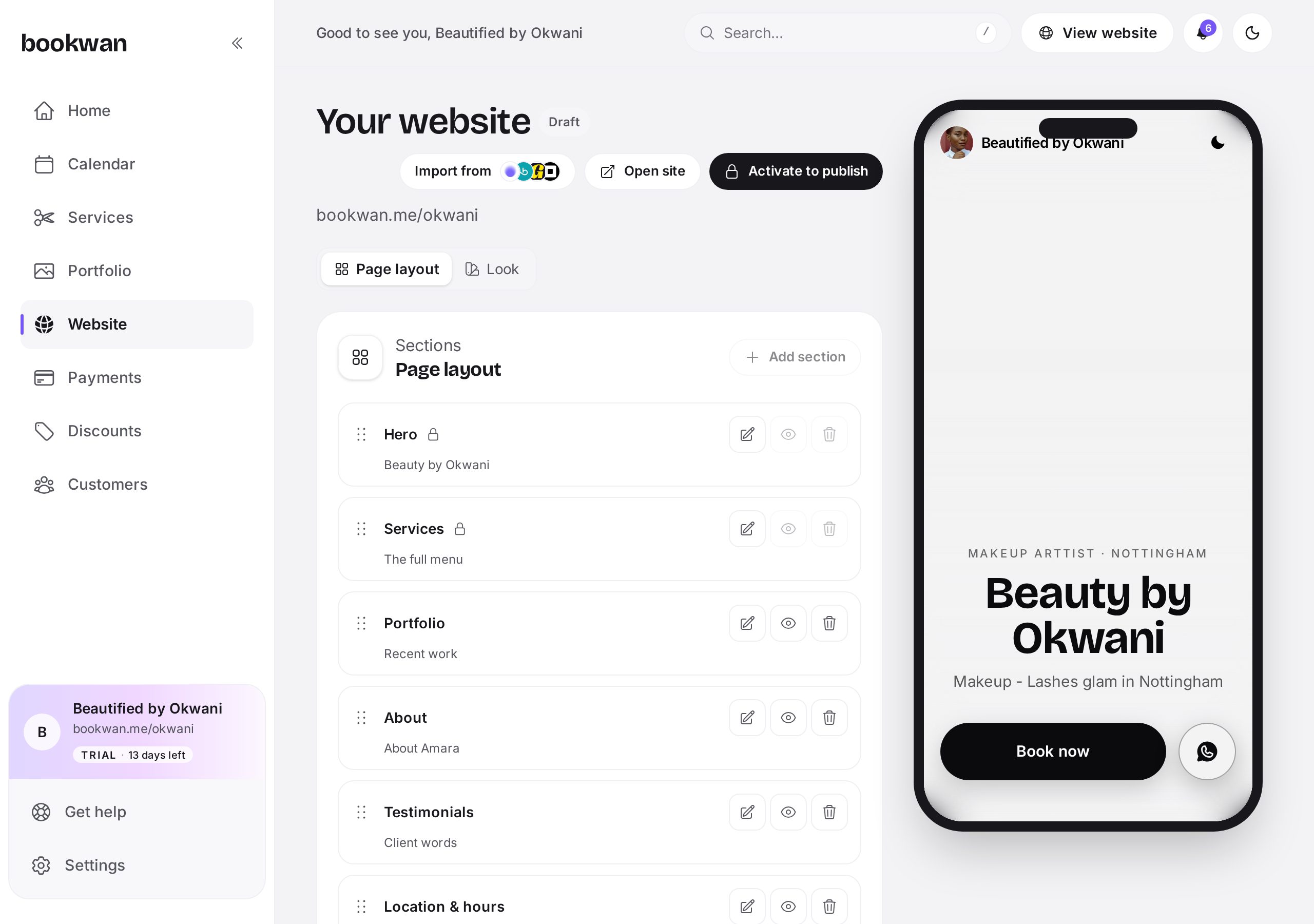
Themes set your typography and layout: Signature, Editorial, Boutique, Noir, Studio or Playful. Pick an accent colour that matches your brand.
- 2
Add and reorder blocks
Hero, services, about, portfolio, testimonials, location and hours, policies, FAQs and a final booking call to action. Drag them into the order that tells your story.
- 3
Import from another platform
Already on Fresha, Booksy or Goldie? Use Import from and we pull your services, hours and details across so you are not retyping everything.
- 4
Preview
Use Preview to see the site exactly as a client would, then check it on your phone before you go live.
- 5
Publish
Tap Publish and your site is live at your handle. Republish any time you change something; drafts stay private until you do.
Put this into practice
Bookwan gives you a booking website, deposits, reminders and your calendar in one app. 15 days free, no card needed to start.
Get startedKeep reading
- A tour of your Bookwan dashboardWhat every part of the dashboard does: setup progress, revenue, today's appointments and the side menu.
- How to add and price a serviceCreate a service with duration, price, deposit and staff, then add variations such as lengths or add-ons.
- How to manage your calendar and availabilitySet working hours, block time off, reschedule an appointment and see clashes side by side in your diary.