1. Connect payments
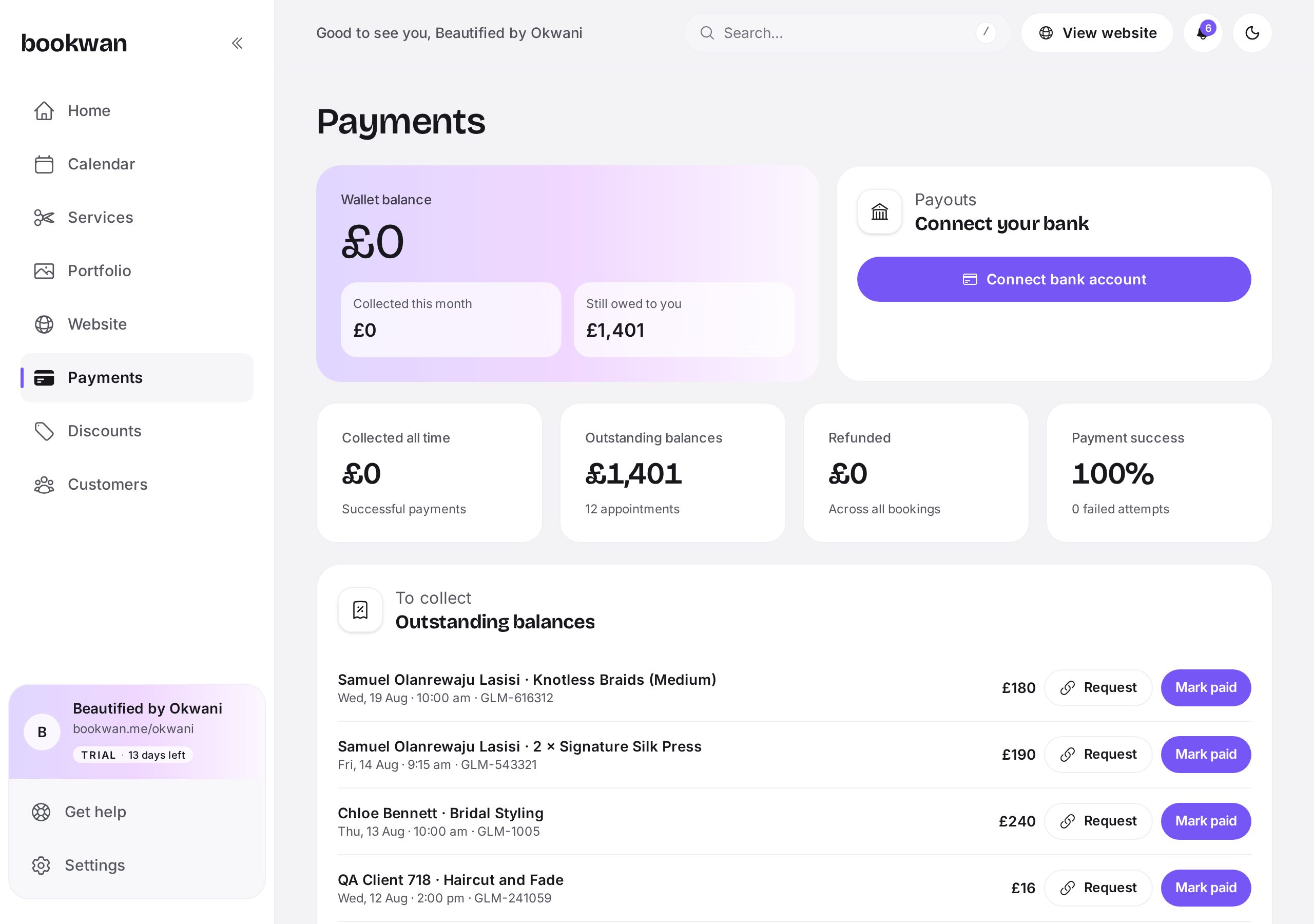
Open Payments and follow the connect flow. You will confirm your identity and add the bank account you want payouts to land in. It takes a few minutes and unlocks deposits on every service.
2. Decide your split
Choose how much is taken at booking and how much is due on the day, either as a percentage or a fixed amount. A deposit of 20 to 50 percent is normal in the beauty industry.
3. Read your transactions
- Paid: the client's card was charged successfully.
- Deposit paid: the up front portion is in, with a balance still to collect.
- Refunded: money returned to the client, in full or in part.
- Failed: the card was declined, so the slot was not held.
4. Track payouts
The payouts panel shows your available balance and the next payout date. You can open a payout to see exactly which appointments it covers.
Put this into practice
Bookwan gives you a booking website, deposits, reminders and your calendar in one app. 15 days free, no card needed to start.
Get startedKeep reading
- A tour of your Bookwan dashboardWhat every part of the dashboard does: setup progress, revenue, today's appointments and the side menu.
- How to add and price a serviceCreate a service with duration, price, deposit and staff, then add variations such as lengths or add-ons.
- How to manage your calendar and availabilitySet working hours, block time off, reschedule an appointment and see clashes side by side in your diary.